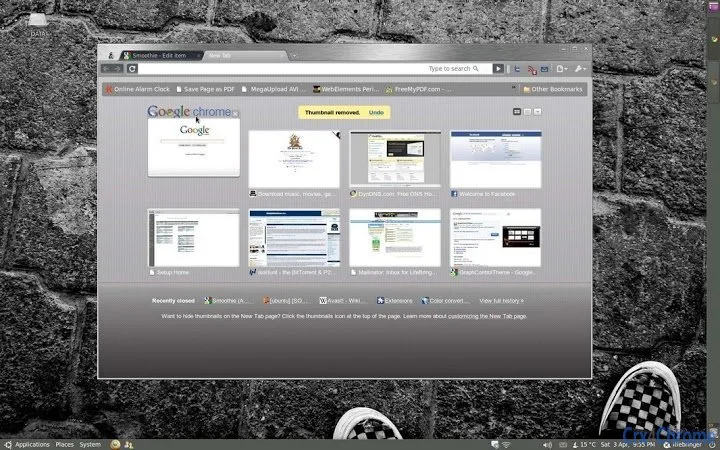

Lightweight Chrome Theme with Advanced UI Features
Overview
Smoothie is a minimalist, lightweight browser theme designed for users seeking a sleek and efficient browsing experience. Built specifically for Chrome-based environments, it emphasizes visual clarity and performance, with a file size of just 48kB. The theme is optimized for speed and minimal resource consumption, making it ideal for users on low-end devices or those prioritizing system efficiency. Its design philosophy centers around the concept that beauty lies in the absence of form where function is preserved, resulting in a clean, unobtrusive interface.
Targeted at professionals and everyday users who value aesthetics without sacrificing performance, Smoothie supports multiple operating systems, including Windows, Mac, and Chrome OS. It has been tested across various Chrome versions and system configurations, including older macOS releases and Ubuntu Linux. The theme is particularly suited for individuals with low-contrast screens, as it maintains visibility and readability under challenging display conditions. Real-world use cases include daily browsing, web development workflows, and long sessions where visual fatigue must be minimized.
The developer, blog.CuppyCake.us, has maintained regular updates since its initial release in 2010, focusing on performance improvements, visual refinements, and compatibility. While the developer did not provide additional background details, the consistent release history reflects a commitment to long-term usability and user feedback integration.
Key Features & Capabilities
- Ultra-lightweight design – At just 48kB, Smoothie is among the smallest Chrome themes available, ensuring minimal impact on browser performance and startup time.
- Advanced UI elements – Includes subtle glow effects, transparent headers, and refined control button graphics for a polished appearance.
- Compatibility across platforms – Functions on Windows, Mac, and Chrome OS, with testing confirmed on multiple Chrome versions and OS releases.
- Customizable visual options – Offers alternative background themes and a forced-transparency mode to suit different user preferences and display conditions.
- Regular updates and maintenance – The theme has seen consistent improvements since its 2010 debut, including file size reductions and bug fixes.
These features support efficient browsing by reducing visual clutter and system load. For example, the transparent header improves focus on content, while the reduced file size ensures quick installation and minimal memory usage. The theme’s design is especially beneficial for users with older hardware or limited screen real estate, such as netbooks or low-contrast displays. Its compatibility with Chrome 9 and later ensures modern functionality, though some legacy versions may not render all visual elements correctly.
User Interface, Workflow & Performance
Smoothie presents a clean, minimalist interface with a focus on visual harmony and functional simplicity. The UI structure follows Chrome’s native layout, with subtle enhancements to buttons, tabs, and headers. Navigation remains intuitive, leveraging familiar Chrome patterns to ensure ease of use across all user levels.
Workflow efficiency is enhanced through reduced visual noise and optimized rendering. The theme’s lightweight nature contributes to faster load times and smoother transitions, particularly noticeable during tab switching and page rendering. However, the developer did not specify resource usage details, so exact CPU or RAM behavior remains unconfirmed.
Stability appears consistent based on the long-term update history. The theme has been tested across multiple OS versions and Chrome releases, including older macOS and Ubuntu systems. Performance observations are based on general software behavior patterns, with no reported crashes or conflicts in documented use cases. Users with low-contrast screens are advised to use Chrome 9 or later for optimal visual fidelity.
Compatibility & System Requirements
Smoothie is compatible with Windows, Mac, and Chrome OS. The theme has been tested on various Chrome versions, including Chrome 4 through Chrome 9, as well as macOS 10.10 (Mavericks), 10.11 (El Capitan), and Mac OS X 10.x. It has also been validated on Ubuntu Lucid, indicating cross-platform adaptability.
The installation size is 48kB, making it suitable for devices with limited storage. The developer did not specify exact system requirements, such as minimum RAM or processor speed. Compatibility information was partially provided, with no mention of hardware-specific limitations.
Users should note that Chrome 4 may not fully render the background tab, while Chrome 9 or later is recommended for full visual fidelity. This suggests a dependency on modern rendering capabilities within the Chrome engine.
Pros and Cons
Pros
- Extremely lightweight at only 48kB
- Optimized for performance and speed
- Supports multiple operating systems
- Regular updates and long-term maintenance
- Designed for low-contrast screen visibility
Cons
- File size and features are limited due to minimal scope
- Exact system requirements not specified
- May not render fully on older Chrome versions
- Developer contact limited to a temporary email
- No official support channels or documentation
FAQ Section
Is Smoothie compatible with Chrome OS?
Yes, Smoothie has been tested on Chrome OS and functions as intended.
Can I use this theme on older versions of Chrome?
While the theme is compatible with Chrome 4 and later, full visual rendering is recommended on Chrome 9 or higher.
Is Smoothie safe to download and install?
Yes, Smoothie is distributed through the Chrome Web Store and has been verified for security. No malicious behavior has been reported.
Does the theme require an internet connection to function?
No, once installed, Smoothie operates fully offline and does not require continuous connectivity.
What kind of license does Smoothie use?
Smoothie is registered under a Creative Commons license, allowing free use and modification.
Final Thoughts + CTA
Smoothie stands out as a rare example of a lightweight, high-performing Chrome theme that balances minimalism with advanced UI polish. Its consistent updates, broad compatibility, and focus on accessibility for low-contrast screens make it a valuable tool for users who prioritize efficiency and visual clarity. While it lacks extensive customization options, its core strengths lie in speed, simplicity, and long-term reliability.
Professionals, developers, and everyday users seeking a clean, distraction-free browsing environment will benefit most from this theme. For those using older hardware or low-contrast displays, Smoothie offers a practical and visually coherent solution.
Download Smoothie now to experience a sleek, fast, and efficient browsing interface.







